User Experience Engineering
Monday, March 20, 2006
Ken's Meme Deflector: XBlogThis!: An Extended BlogThis! Button


User Experience Engineering
Sunday, March 19, 2006
IE6 Stretches Css Box Elements
Other authors have noted that Internet Explorer 6 will "stretch" box elements to accomodate their contents. I came across this bug when creating a CSS-based bar graph. Note that "1.3%" has expanded to enclose the words "US Average 1.30%", making it useless as a graph bar.
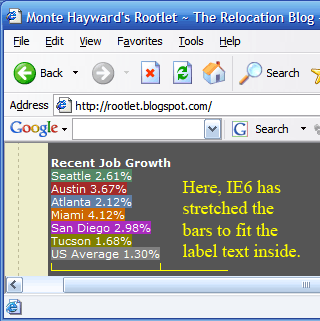
Firefox 1.5 does not have this problem. It rendered the bar 1.3% wide, and allowed the text to overflow the box, as coded:
 .graphBody{
  display:block;
  width:400px;
  background:#555;
  border:none;
  white-space:nowrap;
  color:WHITE;
  padding:3px;
  font:11px verdana,sans-serif ;
 }
 .graphBody a{font-weight:bold;}
/* snip */
 .USAverage{
  background:GRAY;
 }


<div class="graphBody">
<a title="Addition of new jobs">Recent Job Growth</a>
 <div style="width:2.61%" class="Seattle"> Seattle  2.61%</div>
 <div style="width:3.67%" class="Austin"> Austin   3.67%</div>
 <div style="width:2.12%" class="Atlanta"> Atlanta  2.12%</div>
 <div style="width:4.12%" class="Miami">  Miami      4.12%</div>
 <div style="width:2.98%" class="SanDiego"> San Diego 2.98%</div>
 <div style="width:1.68%" class="Tucson"> Tucson     1.68%</div>
 <div style="width:1.30%" class="USAverage"> US Average 1.30%</div>
</div>
This occurred despite the use of strict mode. To defeat the IE6 Box-stretch bug, I added spans to contain the text, and gave them a position:absolute. At first, this caused the desired text flow, but the background color of the containing DIV was lost. This was remedied by the addition of a height attribute to the containing DIV.
 .graphBody{
  display:block;
  width:400px;
  background:#555;
  border:none;
  white-space:nowrap;
  color:WHITE;
  padding:3px;
  font:11px verdana,sans-serif ;
 }
 .graphBody div{display:block;overflow:visible;height:13px}
 /* div height 13px, plus span position:absolute;
           forces labels to flow outside the box in IE6 */
 span.lbl{
  position:absolute;
  text-indent:100px;
  white-space:nowrap;
  width:394px;
 }
 .graphBody a{font-weight:bold;}
 /* snip */


<div class="graphBody">
<a title="Addition of new jobs">Recent Job Growth</a>
 <div style="width:2.61%" class="Seattle"><span class="lbl">Seattle 2.61%</span></div>
 <div style="width:3.67%" class="Austin"><span class="lbl">Austin 3.67%</span></div>
 <div style="width:2.12%" class="Atlanta"><span class="lbl">Atlanta 2.12%</span></div>
 <div style="width:4.12%" class="Miami"><span class="lbl">Miami 4.12%</span></div>
 <div style="width:2.98%" class="SanDiego"><span class="lbl">San Diego 2.98%</span></div>
 <div style="width:1.68%;height:13px" class="Tucson"><span class="lbl">Tucson 1.68%</span></div>
 <div style="width:1.3%" class="USAverage"><span class="lbl">US Average 1.30%</span></div>
</div>
Archives
March 2006 May 2006 July 2006 August 2006 January 2007 March 2007 April 2007 August 2007 March 2008 April 2008 August 2008 April 2010 May 2010 July 2010 September 2010 April 2011 November 2012 March 2013 December 2013
