User Experience Engineering
Monday, April 28, 2008
Ban the Beachball : Fix Eclipse on Mac OS X
java.lang.IllegalArgumentException: The feature 'application' is not a valid feature
...
Root exception:
org.eclipse.osgi.framework.internal.core.AbstractBundle$BundleStatusException
...
MESSAGE While loading class "org.eclipse.mylyn.tasks.ui.TasksUiPlugin", thread
"Thread[main,6,main]" timed out waiting (5000ms) for thread "Thread[Worker-3,5,main]"
to finish starting bundle "update@plugins/org.eclipse.mylyn.tasks.ui_2.0.0.v20070627-1400.jar [399]".
To avoid deadlock, thread "Thread[main,6,main]" is proceeding but
"org.eclipse.mylyn.tasks.ui.TasksUiPlugin" may not be fully initialized.
 After reading numerous posts on the topic, I tried many different fixes. Finally, I read the words of Eugene Kuleshov: "Another option is disable Mylyn's hyperlink detector wich you can do at Window / Preferences / General / Editors / Text Editors / Hyperlinking."
What worked
- Open Eclipse Preferences (Apple-,).
- Type filter text "hyperlink", or navigate to General : Editors : Text Editors : Hyperlinking.
- Deselect checkboxes "Mylyn Tasks" and "Mylyn URLs".
- Click Apply, then OK.
- Restart Eclipse.
Results
Eclipse has faster startup, scrolling, and search, takes up less memory, saves without beachball delays, and supports my favorite plugins nicely. Turning off Mylyn hyperlinking makes my days more productive.Other Fixes Tried
- Removing or disabling Mylyn did not work. It seems there are circular dependencies.
- Removed or disabled plugins, including Aptana and JSEclipse.
- Upgraded to 4GB of RAM. Already had 2.6GHz MacBook Pro with 180Gb HD, and Mac OS X Leopard (10.5.2).
- Freed up 80GB of hard disk space.
- Increased Eclipse memory settings, and found out along the way that Eclipse has a Mac OSX bug that prevents Java VM detection. In the thread "--launcher.XXMaxPermSize: Can't identify Sun VM" you'll find no fewer than 34 posts, and no resolution, as of 2008-04-21. "java.lang.OutOfMemoryError: PermGen space" was the original complaint.
- Turned off Eclipse spell-checking. General : Editors : Text Editors : Spelling. This eliminated the yellow squiggly highlights under variable names and reserved words such as "var", and sped up editing. Typically 100 such warnings in a 600-line JavaScript file. With six files open, memory footprint included Real Memory: 347MB, Vmem: 2.08GB. Without spellchecking, 214MB and 1.95GB.
- Ran JBoss at the command line, instead of in Eclipse.
- Turned Aptana code completion (contextual help) delay up to 9999 milliseconds.
Labels: beach ball, beachball, eclipse, mac osx, mylyn


I'm using Ganymede (3.4) and the checkboxes are named slightly differently. I disabled "Tasks" and "Task URLs" and the delays have gone away (so far, anyway). I've got Java 1.4, 1.5 and 1.6 and am running 10.5.4.
Thanks again,
. John
posted by
 John K : July 23, 2008 2:14 PM
permalink
John K : July 23, 2008 2:14 PM
permalink
Cliff
www.jspell.com
posted by
 : April 27, 2009 5:00 PM
permalink
: April 27, 2009 5:00 PM
permalink
Sunday, March 02, 2008
Use Cruzer on Mac OS X and Keep U3 -- Easily
Synopsis: I can use my SanDisk Cruzer on Mac OS X, with a simple settings change. From Windows XP, I disabled U3 security in the U3 Launchpad menu. No removal tool or hacks were necessary. I can now launch Windows applications from the USB key, and use it as file storage on Mac and Windows.
Many forum and blog posts complain about lack of Mac OS X support on the flash drives made by SanDisk, which come with U3.exe Launchpad. They describe U3 Software removal tools and reformatting the flash drive in order to "use all of it". These steps allowed me to make a simple settings change, and retain the ability to launch programs on Windows XP using "U3 Smart Programs."
Prepare SanDisk USB for Mac OS X
- Insert Sandisk Cruzer into Windows XP USB port.
Autoplay causes the U3 prompt to come up. - Enter password.
System tray icon "U3" appears. - Click on U3 System Tray icon
- Select "Disable Security"

- Re-enter password if prompted.

- Security button changes to "enable:.


That's it. To verify that it worked, I performed the following steps.
Verify U3 USB Key Working on Mac OS X
- Click U3 System tray icon, and select "Eject".
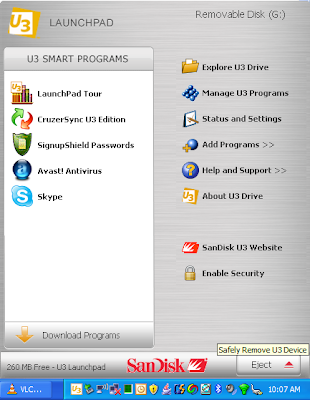
- Remove flash drive from Windows USB port.
(In my case, the SanDisk Cruzer micro 4GB) - Stick flash drive into Mac OS X USB port
- In Finder, click on the drive.
(It appeared as "No Name", next to Macintosh HD.)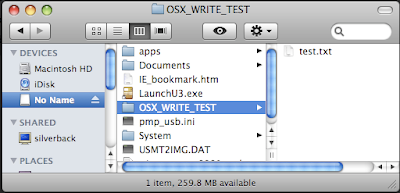
- Select any subfolder.
e.g. Documents - Perform read/writes to the USB key from Mac OS X.
e.g.:Create new folder, edit a text file, save a new file, copy files to and from the flash drive


Labels: flash drive, launchpad, mac osx, SanDisk, u3, usb key, windows xp
Archives
March 2006 May 2006 July 2006 August 2006 January 2007 March 2007 April 2007 August 2007 March 2008 April 2008 August 2008 April 2010 May 2010 July 2010 September 2010 April 2011 November 2012 March 2013 December 2013
